The three standards, and how they relate
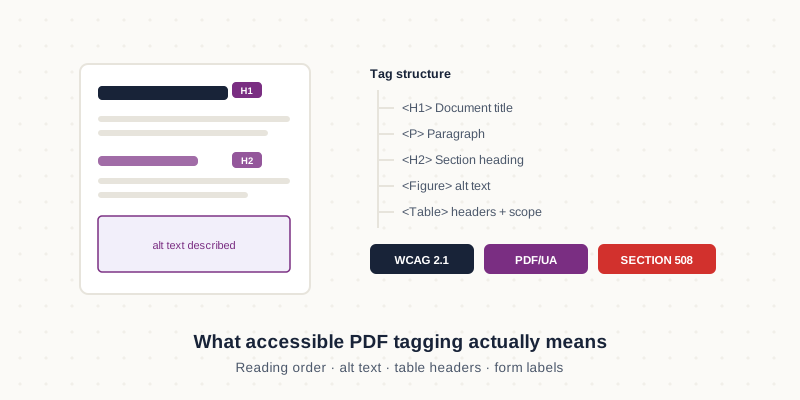
WCAG 2.1 is the underlying web content accessibility guideline, and it is what most regulations point to. PDF/UA (ISO 14289) is the PDF-specific technical standard that describes how a PDF must be structured to be accessible. Section 508 is United States federal procurement law requiring accessible documents; the UK equivalent flows from the public sector accessibility regulations, and Australia works to the Digital Service Standard. In practice they overlap heavily — a document built properly to PDF/UA will satisfy most of what the others demand.
What tagging actually means
An accessible PDF carries an invisible structural layer describing what each element is: this is a level-two heading, this is a table with these column headers, this is a list, this image conveys this meaning. A screen reader uses that layer to navigate and describe the document. A PDF without it is, to a screen reader user, an undifferentiated wall of text with no way to skip, scan or understand structure. Most PDFs exported straight from Word or InDesign have partial tagging at best.
What remediation involves
Bringing an existing PDF up to standard usually means: adding or correcting the tag tree, setting the logical reading order (which frequently differs from the visual order), writing meaningful alt text for images and charts, marking table header rows and column scopes, labelling every form field, checking colour contrast, and setting document language and title metadata. Automated checkers catch perhaps half of the failures; the rest need a person, and genuine verification means testing with an actual screen reader rather than trusting a green checkmark.
Scoping a backlog
Organisations rarely have one document to fix — they have hundreds, discovered all at once. The practical approach is to triage: fix the documents that are public-facing and high-traffic first, then forms, then the archive. Complexity varies enormously per document, so per-page pricing is misleading; a text-only report is quick, while a data-heavy annual report with dozens of charts and tables is a different job entirely. Audit a representative sample before committing to a programme-wide budget.
Need this done rather than explained?
We provide accessible pdf remediation service for businesses in the US, UK and Australia — fixed quotes, human QA on every file, delivered remotely in your time zone.
Hire an Accessibility Expert →